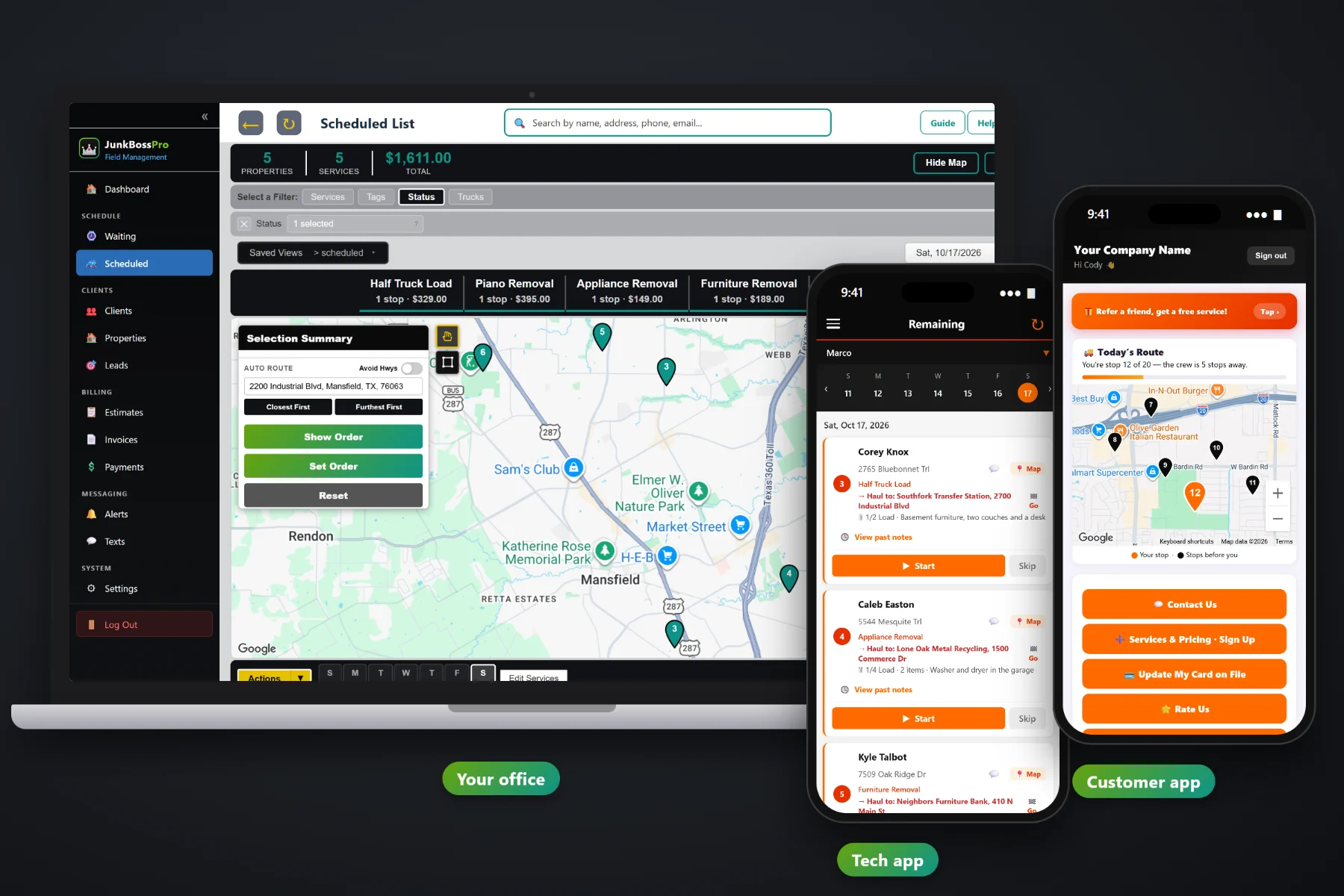
A junk removal business starts with one truck, a trailer and a phone that never stops ringing. Then comes a helper, a second truck, a realtor who sends cleanouts, and a pile of dump tickets nobody added up. JunkBossPro keeps the requests, the load prices, the dump fees, the routes, the crew and the invoices in one place, so the owner can see what each job really made and spend less time on the phone.
Plans start at $59/month and cover the whole business: requests, quotes, the schedule, the crew app, dump fees, texting and billing. For the full product tour, start at JunkBossPro. This page is about the owner's side — growing from one truck, pricing loads, watching dump fees and keeping the week under control.
Start with one truck and your own PIN. Add a second truck, a helper and an office login when the work is there.
Min load, quarter, half, three-quarter and full loads, single items and cleanouts, all from your own service list.
Enter the tons on the dump ticket and the overage over the included weight lands on the invoice on its own.
Every unbooked request on a map, so the single item across town gets paired with the cleanout next door.
Realtors and property managers set to Monthly get one statement with every address on its own line.
See what came in, what was billed, what is still owed and which customers keep calling back.
Most junk removal owners know roughly how the month went. Few know what last Tuesday's garage cleanout made after the dump fee. JunkBossPro records the load size, what went, where it was hauled and the tons on the ticket on every job, so the answer is sitting in the job instead of a glovebox full of receipts.
You started a junk removal business to haul, not to learn software. JunkBossPro asks for your service list, your trucks and your people, then gives back a schedule, a crew app and invoices that go out on their own. The crew app runs in the browser on the phones your crew already carries.
Build a service list with your min load, load sizes, single items, cleanouts and same-day service, at the prices you charge.
Set up each truck, give every helper a personal PIN, and add an office login with its own role when you hire one.
CSV import your old list, or let new requests come in from the form on your website. Addresses are placed on the map automatically.
The crew works the route, enters the dump ticket, taps Complete, and the invoice goes out with the overage already on it.
Generic field-service software gives a job an address and a price. A junk removal job is a load size, a list of items, a trip to the dump, a ticket with a weight on it and a customer who wants to know when the truck is coming. Leave any of that on paper and the margin goes with it.
Ask any junk removal owner how the week went and you will hear the same thing: a notebook of callbacks, a calendar on the phone, dump tickets on the dashboard and a guess about whether the big cleanout actually made money after the dump fee. Whether the realtor got billed for all four houses. Whether the mattress pickup across town could have waited until the truck was over there anyway.
That belongs in one place, not in the owner's head. When it lives on the job and the client record, the owner can step off the truck and the business keeps running.
JunkBossPro keeps the request, the quote, the load, the dump ticket and the payment together, from the first phone call to the paid invoice.
Everything here exists to help a small junk removal business book more full days, bill every dump fee and spend fewer evenings on paperwork.
Every request not booked yet, on a live map and a list: single items, cleanouts and on-site estimate visits.
Estimates built from your services. The customer approves online and the approved estimate becomes the job.
Min Load, 1/8 through Full Load, and 1.5, 2 or 3 loads, recorded on every job.
Ticket tons minus included tons, times your rate, added to the invoice automatically.
Dump, transfer station, donation center or metal recycler, with a Go button for the crew.
Jobs by day and truck, auto-route Closest First or Furthest First from the yard, print route sheets.
Company login plus PIN, jobs in route order, photos, Start / Skip / Complete and a time clock.
Text customers from the office, with automatic reminders, on-the-way and arrived alerts.
Customers see their place on today's route, request service, pay invoices, rate and refer.
Charge on completion or on a schedule, with online payment and past-due follow-up.
Realtors and property managers get one monthly statement, each line labeled with the address.
Office users with their own roles, employees with PINs and truck assignments.
One client with many addresses, tags, custom fields and every past job.
Simple reports on work done, billing and what is still owed.
Works in the US, Canada, Australia, New Zealand and the UK, billing in the customer's currency.
Start $59, Pro $89 and Crew $199 per month, with a 14-day free trial.
With one truck, the owner is the dispatcher, the driver and the bookkeeper. With two, somebody has to decide which truck gets which job. JunkBossPro puts every request on the Waiting List map, lets you drag jobs onto a truck and a day, and auto-routes from the yard. A common setup is one truck on single items and small loads and one on cleanouts and big jobs. For the full picture of growing a junk removal business, read Running a Junk Removal Business: The Complete Guide to Trucks, Prices, Crews and Software.
One-time pickups pay the bills. Partners and repeat customers make the business steady. A realtor with three listings, a property manager with move-out trash-outs every month, a homeowner clearing the garage every spring — each one lives as a client with their addresses, their history and their billing. Partners set to Monthly get one statement with every address labeled, and homeowners get reminders, a live route map and a link to rate and refer.
Pick the plan that fits your business today and move up when you add trucks. Every plan starts with a 14-day free trial and no credit card.
Compare plans on the pricing page.
Yes. With one truck, the owner is doing every job and every phone call, so anything that cuts callbacks and evening paperwork pays off first. The Start plan is $59/month, and you add trucks, helpers and office users as you grow.
Each job can record the tons on the dump ticket, the tons included in your price and your per-ton rate. The overage is added to the invoice automatically, so a heavy load does not quietly eat the margin.
Yes. You build the service list: min load, quarter, half, three-quarter and full loads, single items like mattresses, appliances, hot tubs and pianos, cleanouts, shed teardowns and same-day service, at whatever prices you charge.
Yes. Set the client to Monthly and they get one statement each month covering every address, with each line labeled by address.
Yes. Use CSV import, and imported addresses are placed on the map automatically. Past jobs from that point on build up on each client record.
Start is $59/month, Pro is $89/month, and Crew is $199/month. Every plan starts with a 14-day free trial with no credit card.
Running the business is one side of JunkBossPro. For the Waiting List, quotes, the crew app, the customer app and billing in detail, see the full JunkBossPro platform overview.
Practical reading on starting with one truck, adding a second, hiring, load pricing, minimum charges, dump fees, donating and recycling, reviews and referrals, partners, seasons, reports, the weekly office routine and moving off paper.
Load prices, dump fees per job, a Waiting List map, a crew app and invoices that go out on their own. Try JunkBossPro free for 14 days.