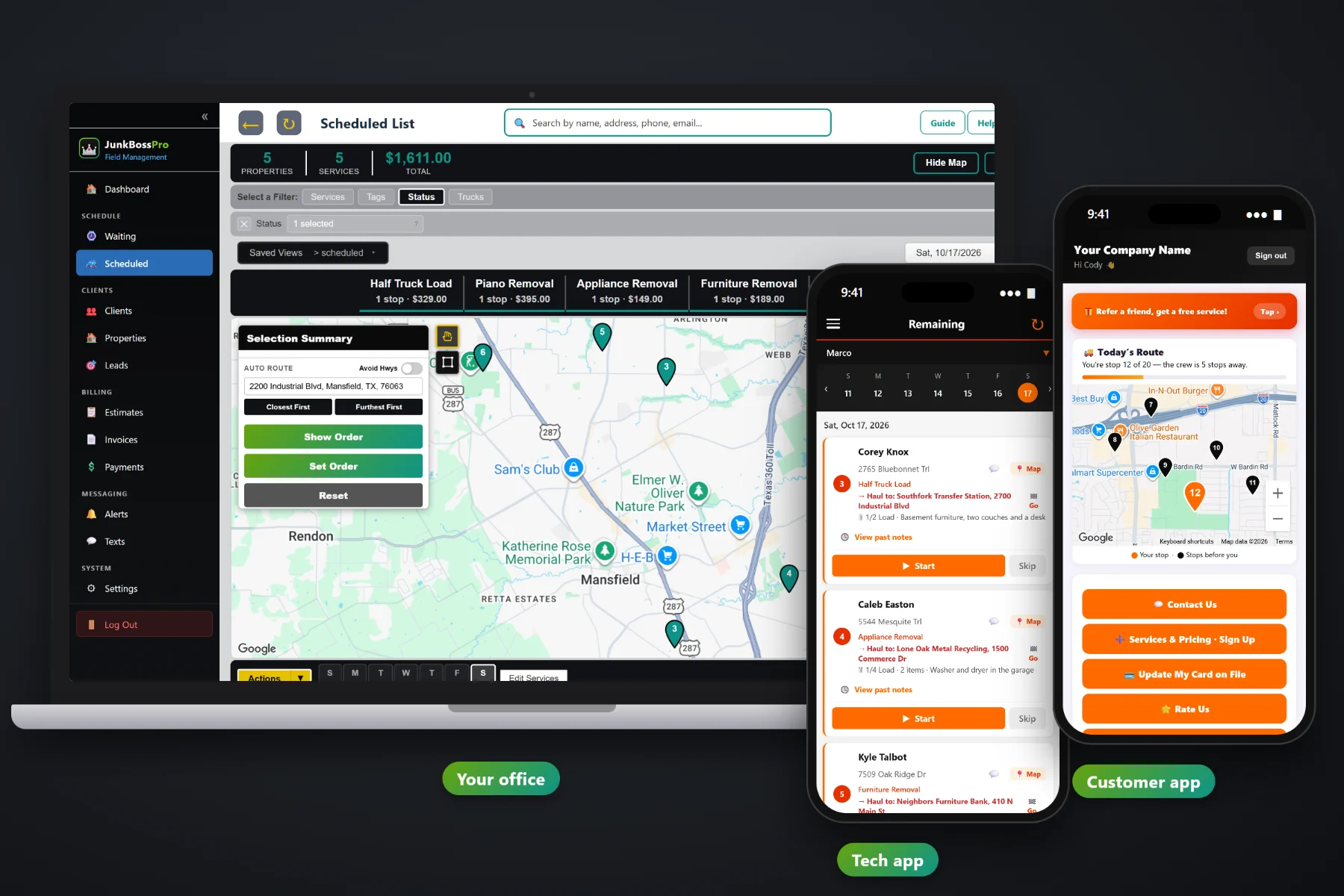
A junk removal day is a pile of single items, half loads and cleanouts spread across town, with a dump run or two in the middle. JunkBossPro puts the load size, the items and the haul-to on every job, adds dump fee overage to the invoice from the ticket, shows unbooked requests on a live map, routes each truck, and puts the whole day on the crew's phones with photos, customer texts and card-on-file payment at the curb.
Plans start at $59/month, and every plan includes the office, the crew app and the customer app. Load sizes, dump fee overage, the Waiting List map, dispatch, estimates and billing are part of the platform, not add-ons. This page covers junk removal software as a whole; for the company behind it, start at JunkBossPro.
Min Load, 1/8, 1/4, half, Full Load, all the way to three loads, on the job and on the crew's card.
Enter the ticket's tons, the tons included and your per-ton rate. The overage lands on the invoice by itself.
Every request that isn't booked yet, on a live map, so you can see what fits near tomorrow's route.
Jobs by day and by truck, auto-routed from the yard, with route sheets you can print.
The crew sees the day in route order. The customer sees where the truck is and pays the invoice.
Complete creates the invoice and can charge the card on file before the truck pulls away.
The person who took the call already knows it's a washer and dryer in the garage, about a quarter load, headed to the metal recycler. JunkBossPro keeps that on the job and puts it on the crew's phone, so the crew loads the right straps and dollies and knows where to drive when the truck is full.
Junk haulers want to be lifting, not typing. JunkBossPro asks for a few details per job and gives back a full truck, a route that makes sense, and fewer calls asking where the crew is. It runs in the browser on the phones your crew already carries.
Set up employees with a personal PIN, assign them to trucks, and build your service list: single items, truck loads, cleanouts and trash-outs.
Calls, website forms and approved estimates go on the Waiting List, a live map and list of everything not booked yet.
Put jobs on a truck and a day, auto-route Closest First or Furthest First from the yard, and print the route sheet if you want paper too.
The crew works the day from the phone. Complete creates the invoice, adds any dump fee overage and can charge the card on file.
Most field-service software gives a job an address, a time and a notes box. A junk job is a load size, a list of items, a dump run and a ticket that might be heavier than the price allowed for. Software that only knows the address leaves the rest in a text thread.
Ask a junk hauler how the week really runs and you'll hear the same story: jobs written on a notepad by the phone, photos of piles sitting in a text thread, a crew that showed up with a quarter load of room for a half-load garage, and a dump ticket that came in heavy with no one sure whether the customer was ever told about the weight limit.
That information belongs on the job, not in somebody's head or camera roll. When the load, the items and the haul-to are on the job, any crew can run any truck and the overage gets billed every time.
JunkBossPro keeps the request, the estimate, the job, the dump ticket and the invoice in one place.
Every tool here exists to fill the truck, keep the crew moving and get paid for every ton that went over the scale.
Min Load, 1/8, 1/4, 3/8, 1/2, 5/8, 3/4, 7/8, Full Load, 1.5, 2 or 3 loads on every job.
Number of items and a plain description, like "Washer and dryer in the garage."
Dump, transfer station, donation center or metal recycler, with one-tap navigation for the crew.
Tons on the ticket, tons included and your per-ton rate. The overage line is added to the invoice.
Optional, if you also leave a dumpster: days included, then a daily rate.
Single items, cleanouts and on-site estimate visits that are not booked yet, on a map and a list.
Jobs by day, filter by truck, auto-route, route order, saved views and printed route sheets.
Company login and PIN, jobs in route order, navigation, Start / Skip / Complete, photos and a time clock.
Crew locations show on the office map, so you know which truck is closest to a same-day call.
"You're stop 12 of 20 — the crew is 5 stops away," plus requests, invoices, payment and referrals.
Built from your service list, approved online, and turned into the scheduled job.
Invoices with sales tax, card on file, auto-charge on completion or on a schedule, past-due follow-up.
Property managers and realtors get one monthly statement with every address on its own line.
Two-way texting with customers and automated reminders. 500 / 1,000 / 2,000 texts a month by plan.
Bring your customer list over in one file. Imported addresses are placed on the map automatically.
Start $59, Pro $89 and Crew $199 per month, with a 14-day free trial and no credit card.
Most junk companies with more than one truck end up splitting the work the same way: a truck running mattresses, appliances and small loads all over town, and a truck that spends half a day at one garage or estate. The Waiting List shows every unbooked request on a map, the dispatch board puts each job on a truck and a day, and auto-routing orders the stops from the yard. The crew's phone shows the same order. For the full picture, read Junk Removal Software: The Complete Guide for Junk Hauling Companies.
Junk jobs go faster when the customer is ready: items pulled out, the garage open, the car moved out of the driveway. Reminders the night before, a text when they're next, a text when the crew arrives, and a live route map in the customer app tell them exactly when to expect the truck. Replies come to the office through two-way texting. When the job is done, the invoice, card on file and online payment are all in the customer app, and they can rate the job and refer a neighbor.
Pick the plan that fits your trucks. Every plan starts with a 14-day free trial and no credit card.
Compare plans on the pricing page.
It is the system that runs a junk hauling company from the first call to the paid invoice: requests and estimates, the schedule for each truck, the crew's day on their phones, customer texts, and billing. JunkBossPro adds what generic field-service software leaves out, like the load size, the items, the haul-to and dump fee overage on every job.
On the job, enter the tons on the dump ticket, the tons included in the price and your per-ton rate. JunkBossPro adds the overage to the invoice automatically, for example "Dump fee overage (0.28 tons @ $70.00) = $19.60". The rates are yours to set.
No app store download. The crew app runs in the browser on iPhone and Android and can be installed to the home screen. Crews log in with your company login and their own personal PIN.
Yes. Set a property manager or realtor to Monthly, and they get one statement each month covering every address you serviced, with each line labeled with the address.
Yes, with a CSV import. Imported addresses are placed on the map automatically, so they show up on the Waiting List and the dispatch board like any other client.
Start is $59/month, Pro is $89/month and Crew is $199/month. Every plan starts with a 14-day free trial with no credit card, and you can click around a fully stocked sample junk removal company in the live demo first.
For everything else, including scheduling, estimates, invoicing, the crew app and commercial accounts, see the full JunkBossPro platform overview.
Practical reading on moving off paper, load sizes, haul-to and dump fee overage, the Waiting List map, dispatch, the crew and customer apps, estimates, billing, monthly accounts, setup, CSV import and choosing software.
Load size, items and haul-to on every job, dump fee overage on the invoice, a live map of unbooked requests, and the whole day on your crew's phones. Try JunkBossPro free for 14 days.