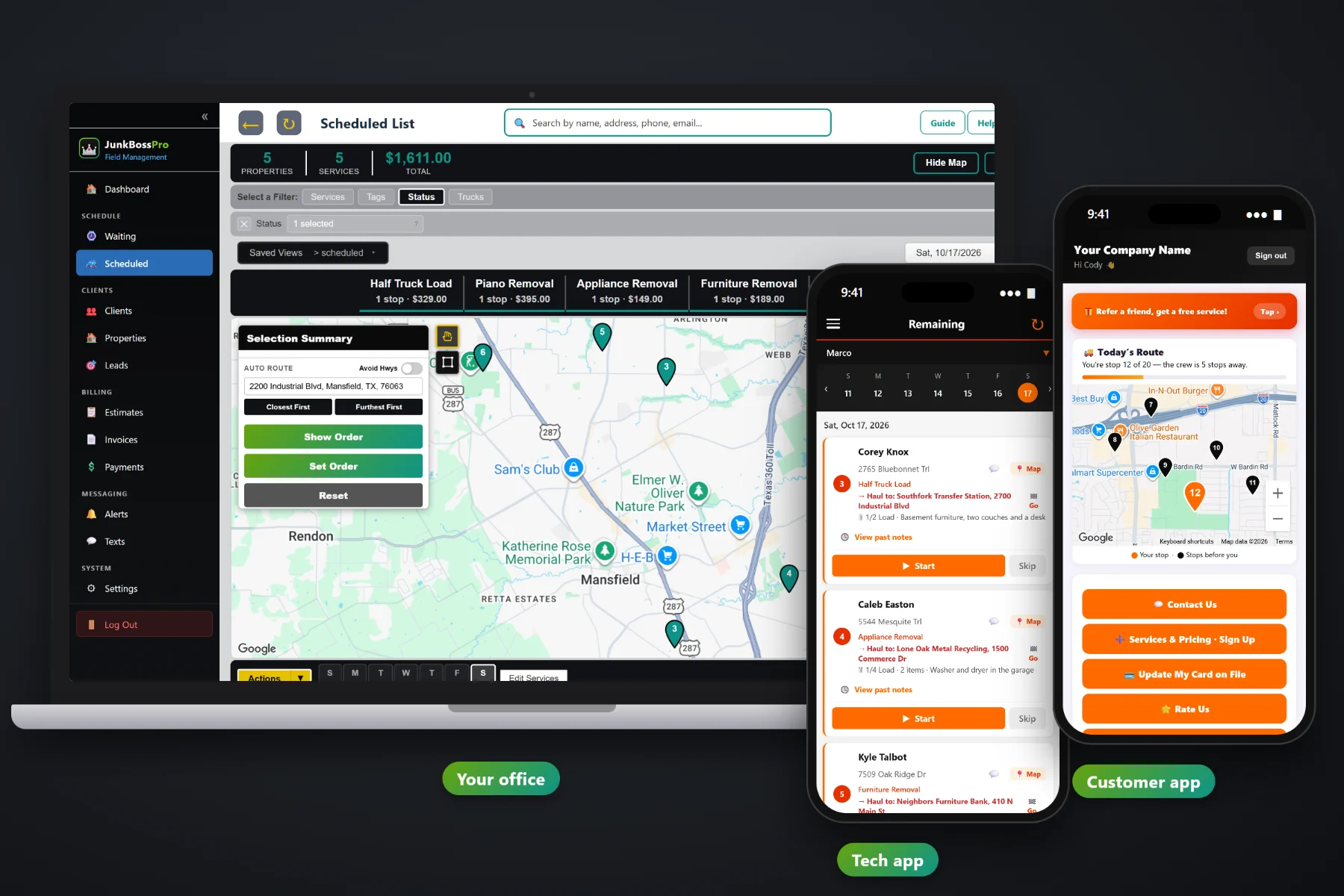
A homeowner calls once. A property manager calls every time a tenant moves out. JunkBossPro keeps every unit, rental, listing and job site under one client, puts lockbox codes and leasing-office notes on the crew's phone, saves before-and-after photos with every trash-out, and sends the manager one monthly statement with every address labeled on its own line.
Plans start at $59/month, and multi-address clients, monthly statements, access notes and crew photos are part of every plan. To see how commercial work fits with the Waiting List, dispatch, the crew app and billing for homeowners, start at JunkBossPro and then come back here for the property manager side.
A management company is one client. Every complex, unit and rental house sits under it with its own notes.
Set the account to Monthly and the manager gets one statement covering every address, each line labeled.
“Keys at the leasing office, ask for maintenance” sits on the address and shows on the crew's card.
Photos taken in the crew app stay with the job, ready when the manager asks whether the closet was cleared.
Load a manager's property list at once. Imported addresses are placed on the map automatically.
Trash-outs and homeowner pickups share one Waiting List, one dispatch board and one set of trucks.
A trash-out in a vacant unit has nobody home to answer the door. JunkBossPro puts the unit number, the load size, what's going, where the keys are and where it's being hauled on the crew's job card, so the crew finishes the unit without calling the office or the leasing desk.
You don't need a separate system for commercial accounts. Add the manager as a client, load their addresses, set them to Monthly, and their trash-outs flow through the same Waiting List, dispatch board and crew app as every homeowner pickup.
Create the management company, realtor or contractor once, with their contacts, tags and custom fields.
Add units by hand or bring in the whole property list by CSV. Each address gets its own access notes.
Each move-out or listing cleanout lands on the Waiting List map next to everything else waiting to be booked.
Crews complete jobs with photos, and the manager gets one monthly statement with every address on its own line.
Generic field-service software treats every job as one customer at one address. A property manager is one customer with forty addresses, a lockbox at half of them, a leasing office at the rest, and an accounts payable clerk who wants one bill a month.
Ask any junk hauler who works with property managers how the month really goes: trash-out requests by text, email and voicemail, a lockbox code nobody wrote down, and at the end of the month a pile of separate invoices the manager's office can't match to their units. Was Unit 214 the half load or the quarter load? Did the crew clear the storage closet? Who signed for the keys?
That belongs on the address and the job, not in a notebook in the truck. When it's there, any crew can run any unit and the statement matches the manager's own list.
JunkBossPro keeps the client, every address, every job, every photo and every invoice in one place.
Every tool here exists to keep property managers, realtors, contractors and business owners calling you back.
Every unit, rental, listing or job site under one client, each with its own notes and history.
One statement each month for a Monthly account, every line labeled with its address.
Bring in a property list at once. Imported addresses land on the map automatically.
Lockbox codes, leasing office hours, gate codes and dumpster rules on the address, shown on the crew card.
Taken in the crew app and saved with the job for the manager, the agent or the executor.
Min Load through Full Load, 1.5, 2 or 3 loads, plus item count and a note on what is going.
Enter the tons from the dump ticket, the included tons and your rate. The overage line is added to the invoice.
For contractors who need a dumpster on site: days included, then a daily rate.
Every unbooked trash-out, cleanout and estimate visit on one map next to the route for tomorrow.
Jobs by day and truck, auto-route Closest First or Furthest First, saved views and printed route sheets.
Quote from your service list. The manager approves online and the estimate becomes the scheduled job.
Text the manager or agent from the office, plus automatic on-the-way and arrived alerts.
Managers request service, see invoices, pay and update the card on file.
Tag clients as property manager, realtor or contractor and keep PO numbers or portfolio names in custom fields.
Works in the US, Canada, Australia, New Zealand and the UK, billing each customer in their own currency.
Start $59, Pro $89 and Crew $199 per month, with commercial accounts on every plan.
A property manager's move-outs don't need their own system. They land on the Waiting List map next to single-item pickups and garage cleanouts, so the office can see that the unit across town is two blocks from tomorrow's mattress pickup. Assign it to a truck, auto-route from the yard, and the crew's phone shows the same order. For the full walkthrough, read Commercial Junk Removal Software: The Complete Guide to Property Manager, Realtor and Contractor Accounts.
The manager's office pays dozens of vendors. The one that sends a single clean statement with each address labeled is the one that gets paid without a phone call. Set a property manager, realtor or contractor to Monthly and every completed job that month rolls into one statement. They can see invoices and pay in the customer app, request the next trash-out there, and text the office when a new move-out comes up.
Pick the plan that fits your trucks. Every plan starts with a 14-day free trial and no credit card.
Compare plans on the pricing page.
Yes. The management company, landlord, realtor or contractor is one client, and every unit, rental house, listing or job site is an address under that client. Each address keeps its own access notes, measurements and job history.
Set the client to Monthly. Instead of an invoice per job, they get one statement each month covering every address you worked at, with each line labeled by address. The statement can be paid by card on file or online in the customer app, and past-due follow-up works the same as any invoice.
In the access notes on the address. They show on the crew's job card every time that address is on the schedule, along with past notes from earlier visits, so the crew does not need to call the office to get in.
Yes, by CSV import. Imported addresses are placed on the map automatically, so the next trash-out request shows up in the right spot on the Waiting List.
Yes. Trash-outs, contractor debris and office cleanouts land on the same Waiting List and dispatch board as single-item pickups and garage cleanouts. Many owners keep one truck on single items and small loads and one on cleanouts and bigger jobs.
Start is $59/month, Pro is $89/month, and Crew is $199/month. Commercial accounts and monthly statements are on every plan, and every plan starts with a 14-day free trial with no credit card.
Commercial accounts are one piece of how JunkBossPro runs a junk removal company. For the Waiting List, dispatch, the crew app, estimates and billing for homeowners, see the full JunkBossPro platform overview.
Practical reading on apartment trash-outs, landlords and realtors, contractors and remodel debris, office and retail cleanouts, access notes, photos, monthly statements, CSV import and keeping commercial accounts.
Every address under one client, access notes on the crew's phone, before-and-after photos on every trash-out and one monthly statement. Try JunkBossPro free for 14 days.