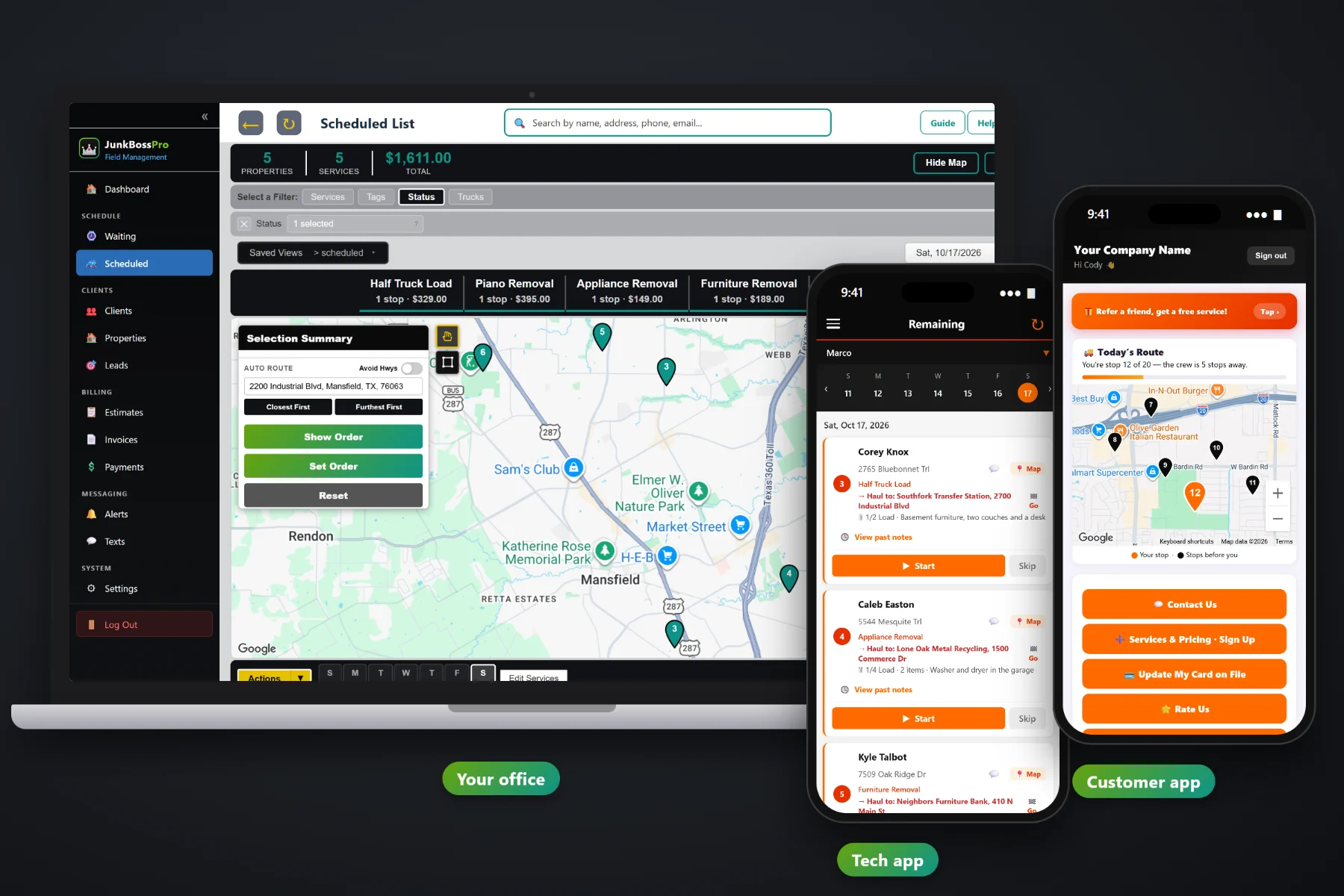
A junk removal day is never the same twice. A mattress at 8, a garage cleanout at 9, a hot tub at noon, a dump run whenever the box is full, and two same-day calls that came in while the crew was loading. JunkBossPro puts every request on a Waiting List map, every booked job on a dispatch board by day and truck, and every stop in route order on the crew's phone, with the haul-to address and a Go button between jobs.
Plans start at $59/month, and scheduling and dispatch are part of every plan. The Waiting List map, the dispatch board, auto-routing, route sheets, crew GPS and customer texts come with the platform, not as add-ons. To see how scheduling fits with estimates, the crew app and billing, start at JunkBossPro and then dig into the dispatch side here.
Every request that isn't booked yet, on a live map and a list. See which single items sit near tomorrow's cleanout.
The dispatch board shows jobs by day, and a truck filter shows one truck's day at a time.
Closest First or Furthest First from the yard, then adjust the order by hand when a job needs to go first.
Each job says where the load goes: dump, transfer station, donation center or metal recycler, with a Go button for the crew.
Night-before, on-the-way and arrived alerts go out on their own, so the garage is open when the truck backs in.
Crew locations show on the office map, so a same-day call goes to the truck that is actually closest.
Scheduling junk is not like scheduling a lawn route. A single recliner takes fifteen minutes. A full estate cleanout takes the day and two dump runs. JunkBossPro keeps the load size, the item count, what's going and the haul-to stop on every job, so whoever builds the day can see how big each stop is before putting it on a truck.
Most junk owners plan the next day at night, after the trucks are parked. JunkBossPro keeps that short: look at the map of unbooked requests, put jobs on a truck and a day, route them, and the crew's phones are ready in the morning.
Website requests, phone calls and approved estimates show on the Waiting List map and list until they are booked.
Assign each job a day and a truck. Small loads and single items on one truck, cleanouts and big jobs on another.
Auto-route Closest First or Furthest First from the yard, then move a stop by hand if a customer needs the early slot.
The crew opens the day in route order, taps Go to each driveway and each dump, and the customer gets on-the-way and arrived texts.
A calendar app gives every job a time slot and an address. A junk job is a load size, a pile of items, a crew of two or three, and a dump somewhere between this stop and the next one. A schedule that can't see any of that leaves the owner doing the real planning in his head.
Ask any junk hauler how scheduling really works and you'll hear the same story: a whiteboard in the shop, a notebook in the truck, and a phone full of texts that say “can you guys come today?” Nobody knows whether the truck has room for one more couch after the 10 o'clock garage. Nobody wrote down which transfer station takes mattresses. The single-item call across town gets booked on the day the truck is on the other side of the county.
That information belongs on the job and on the map, not in one person's memory. When it's there, anyone in the office can build a sensible day and any crew can run it.
JunkBossPro keeps the request, the load, the route, the haul-to stop and the invoice in one place, from the first phone call to the paid job.
Every tool here exists to get more jobs into each truck with fewer wasted miles, fewer phone calls and fewer customers wondering when you'll show up.
Every unbooked request, single items, cleanouts and estimate visits, on a live map and a list.
The Scheduled List shows jobs by day. Filter by truck to see one crew's day.
Closest First or Furthest First from the yard, with route order you can adjust by hand.
Min Load through Full Load, plus 1.5, 2 or 3 loads, with the item count and what's going.
Dump, transfer station, donation center or metal recycler, with a Go button on the crew's phone.
On-site estimates are jobs on the schedule, routed with everything else that day.
When the customer approves online, the estimate becomes the scheduled job.
Keep the board views you use every day instead of rebuilding filters each morning.
Print the day's route for the truck or for a helper who works off paper.
Night-before, on-the-way and arrived alerts, chosen by the customer, plus two-way texting.
In the customer app: "You're stop 12 of 20 — the crew is 5 stops away."
Crew locations on the office map, so same-day work goes to the nearest truck.
The day in route order on iPhone or Android, in the browser. No app store.
Many addresses under one client, with one monthly statement covering every trash-out.
Works in the US, Canada, Australia, New Zealand and the UK.
Start $59, Pro $89 and Crew $199 per month, with scheduling and dispatch on every plan.
Most junk companies with two trucks end up with the same split: one truck running single items and small loads all over town, and one truck parked at a cleanout most of the day. JunkBossPro's dispatch board makes that split easy to see and easy to keep. Filter by truck, route each day from the yard, and drop the same-day calls on whichever truck is closest on the GPS map. For the full walkthrough, read Junk Removal Scheduling Software: The Complete Guide to Booking, Dispatching and Routing a Junk Hauling Company.
Junk jobs go wrong when the customer isn't ready: the garage is locked, the car is parked in front of the pile, or nobody is home to point at what stays. Automatic reminders the night before, on-the-way and arrived texts as the crew works the route, and a live map in the customer app tell people when to expect the truck. Replies come back to the office through two-way texting.
Pick the plan that fits your trucks. Every plan starts with a 14-day free trial and no credit card.
Compare plans on the pricing page.
Every request that isn't booked yet sits on the Waiting List, on a live map and a list. That includes website requests, calls the office enters, and on-site estimate visits. From there you give the job a day and a truck, and it moves to the dispatch board.
Pick a truck and a day and auto-route Closest First or Furthest First from your yard. You can then set the route order by hand, for example to put a customer who has to leave for work at the top. The crew's phone shows the same order.
Each job carries a haul-to stop: the dump, transfer station, donation center or metal recycler where that load goes. The crew sees it on the job card with a Go button that opens navigation, so the run to unload is part of the day instead of a guess.
Yes. An estimate visit is just a job on the schedule, so it shows on the board and gets routed with everything else. When the customer approves the estimate online, the approved estimate becomes the scheduled job.
Move the job to another day on the board and re-route. If the crew gets there and can't do the job, they tap Skip and note why, and the office sees the note and texts the customer to rebook.
Start is $59/month, Pro is $89/month, and Crew is $199/month. Scheduling and dispatch are on every plan, and every plan starts with a 14-day free trial with no credit card.
Scheduling and dispatch are one piece of how JunkBossPro runs a junk removal company. For estimates, the crew app, dump fee overage, property manager accounts and billing, see the full JunkBossPro platform overview.
Practical reading on the dispatch board, auto-routing, same-day and single-item calls, splitting trucks, the Waiting List map, dump runs, estimate visits, cleanout days, rain days, customer texts, crew GPS, route sheets and after-hours trash-outs.
A Waiting List map of every request, a dispatch board by day and truck, auto-routing from the yard, haul-to stops with a Go button and automatic customer texts. Try JunkBossPro free for 14 days.